

🚀 Introducing Bold Pro. Our new business access solution is now live. Explore now

Logo

Bold Pro Onboarding Hub

Here you'll find everything you need to fully set up and operate your business with Bold Pro - from setup guides to feature explanations, all in one place.

Web Portal access

Web Portal lets you manage everything directly from your browser, instead of relying on the app. It’s built for business teams that want to be in control - wherever they are.

Assign access to user groups

Create user roles, lock groups, and define who gets access to what - down to the hour. Give your team permanent access, limit interns to weekdays, or send one-time access to a technician.

Device groups

Group your devices by any parameter that fits your operational needs - building section, department, etc. This feature gives you the flexibility to organize access and maintain a clear overview.

Scheduled and planned access

Control access by time. Create recurring schedules for employees or plan one-time access in advance for guests and contractors. Access activates and expires automatically.

Extended event log

Bold Pro stores every access event for up to a year. You’ll always see who used which lock and when - including Bold Clicker activations and remote unlocks, with a complete access history, no missing data.

API access

Bold Pro includes access to Bold’s API. This lets you build custom integrations with your own systems, giving you flexibility to adapt Bold to your workflow and automate access management.

Export events history

Download a record of all lock activity. Useful for tracking usage across teams, reviewing specific time periods, or checking detailed access information in case of an issue.


Auto Entry

With Auto Entry function enabled, the door unlocks automatically right when you approach with your phone in your pocket. No keys or app needed - simply turn the knob and walk inside.


‘Keep Active’ mode

Need the door to stay open during business hours? ‘Keep Active’ mode holds the lock open for up to 24 hours, so you don’t have to unlock it each time. One tap keeps it open until you turn it off.

Enable webkeys

Share access through a secure web link - no app required. Ideal for vacation rentals or temporary staff who need easy access without setup. This feature requires a Bold Connect to be enabled.

Invoicing available

Bold Pro ensures every subscription and purchase comes with a digital invoice - issued in your company’s name, automatically. Clear and always ready when you need it.

Verified invitations

Displays both the assigned name and the verified identity from Apple or Google if they differ, helping you quickly spot mismatches, confirm who is accessing the lock, and maintain security.


Step-by-step video guides

Tutorial: Add new Bold Pro lock to your account
How to use a Bold Smart Lock?


Additional information


API documentation

Here you can access all the documentation required to create custom integrations with the Bold API, making it easy to connect the lock to your own systems.

Employee explanation stickers

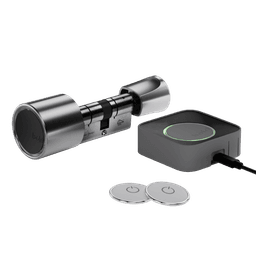
Bold Pro comes with two door stickers. Additional stickers can be requested below. Designed to blend seamlessly into modern spaces.


Feeling lost? We’re here for you.